> For the complete documentation index, see [llms.txt](https://portal.fredy.app.br/llms.txt). Markdown versions of documentation pages are available by appending `.md` to page URLs; this page is available as [Markdown](https://portal.fredy.app.br/portal-fredy./atendimentos/alterar-padrao-de-arquivamento-12h-imediato.md).
# Alterar padrão de arquivamento (12h / imediato)
Este guia oferece uma visão detalhada sobre como configurar e gerenciar os **padrões de arquivamento** na plataforma HelenaCRM. Com essas orientações, você poderá personalizar o sistema para atender melhor às necessidades operacionais da sua equipe, garantindo maior eficiência no gerenciamento de informações.
{% hint style="success" %}
**Pré-requisitos**:
* Acesso à conta na plataforma **Frédy.**
{% endhint %}
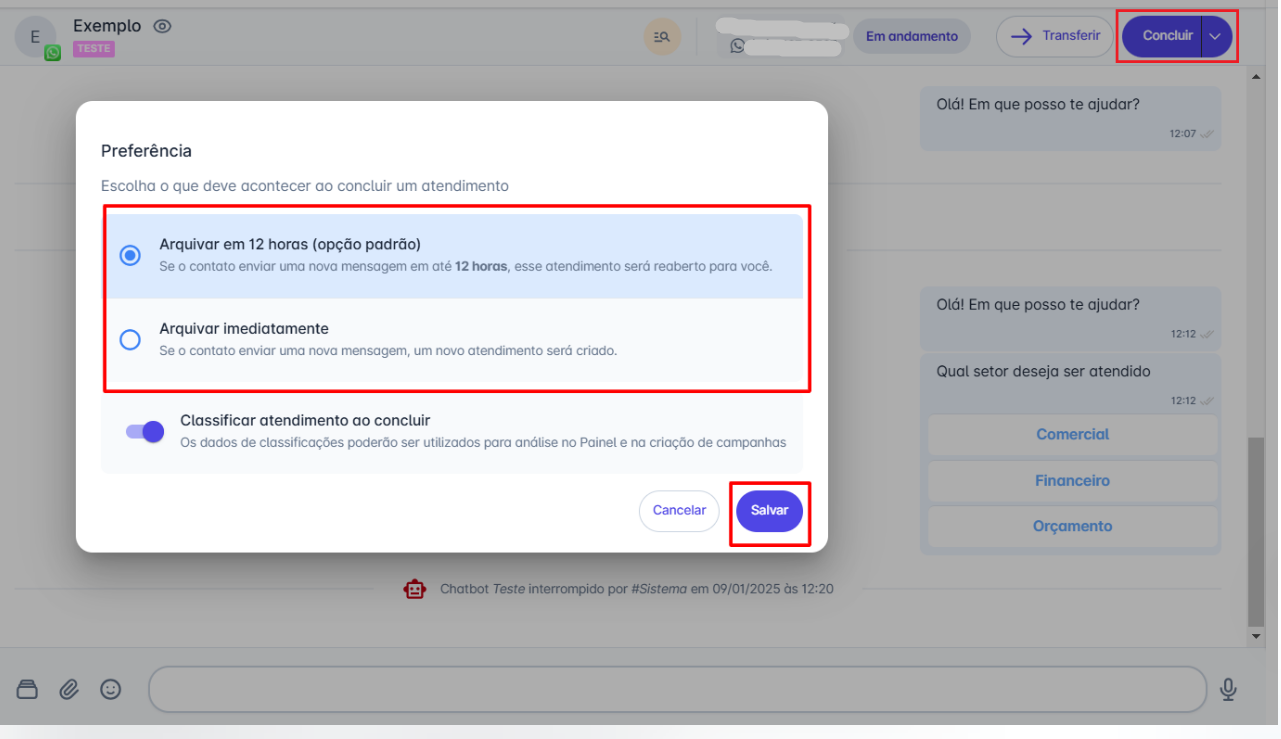
**Passo 1**: Na tela inicial, acesse o menu **"Atendimentos"** e selecione um contato para abrir a janela de conversa. Clique na seta ao lado do botão **"Concluir"** para exibir o menu de opções.
**Passo 2**: A plataforma oferece duas opções de arquivamento:
* **Arquivar em 12 horas (opção padrão):** Caso o contato envie uma nova mensagem dentro desse período, o atendimento será reaberto para o mesmo usuário que concluiu o atendimento.
* **Arquivar imediatamente:** Nesse caso, se o contato enviar uma nova mensagem, será criado um novo atendimento.
Após selecionar a opção desejada, clique em **"Salvar"** para confirmar.
**Considerações Adicionais**:
* Você pode ativar a opção de **classificar o atendimento ao concluir**. Para isso, basta habilitar a chave correspondente.