> For the complete documentation index, see [llms.txt](https://portal.fredy.app.br/llms.txt). Markdown versions of documentation pages are available by appending `.md` to page URLs; this page is available as [Markdown](https://portal.fredy.app.br/portal-fredy./campanhas/exportar-campanha.md).
# Exportar campanha
No **Frédy**, entendemos que a flexibilidade na gestão de campanhas é essencial para otimizar seus processos de vendas e marketing. Por isso, a funcionalidade de **exportação de campanha** permite que você extraia dados valiosos de suas campanhas em formatos fáceis de manipular e analisar.
{% hint style="success" %}
**Pré-requisitos**
* **Acesso à plataforma Frédy.**
* Somente os usuários com perfil de **Administrador** podem exportar dados de **Campanhas** realizadas.
{% endhint %}
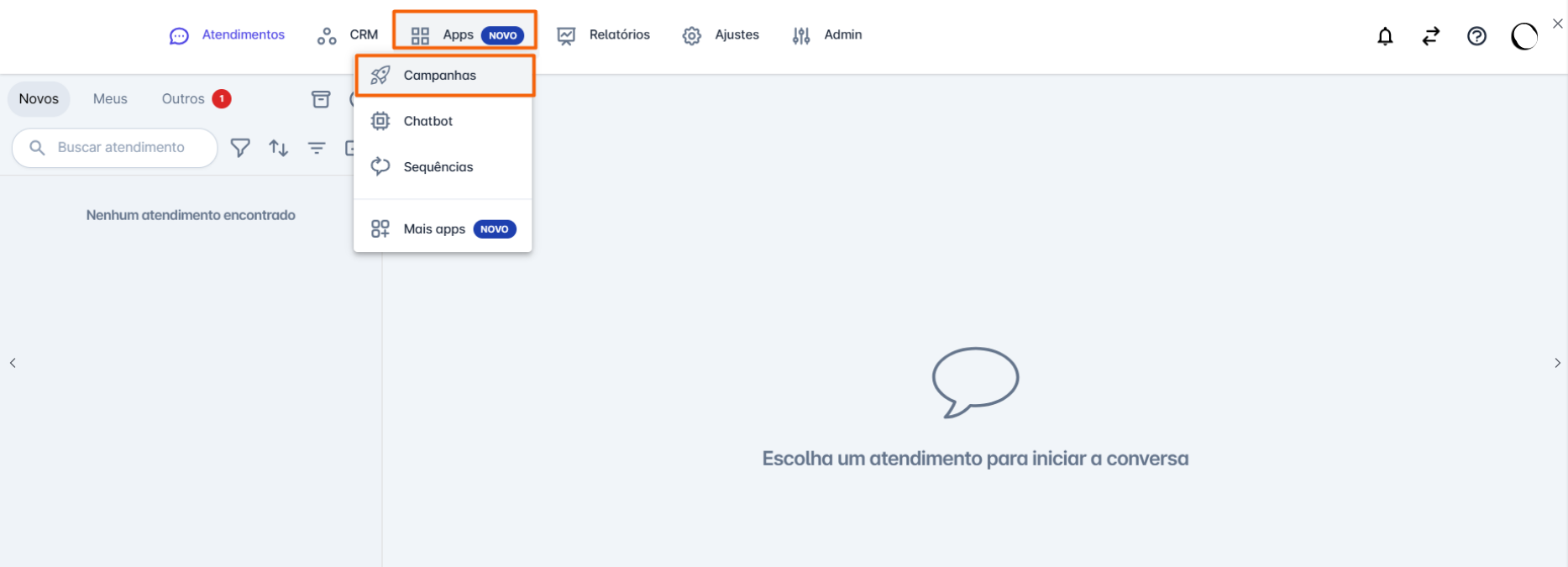
**Passo 1:** Na tela inicial da plataforma, clique em **"Apps"**. O menu de opções será aberto; em seguida, clique em **"Campanhas"**.
**Passo 2:** Selecione a campanha da qual deseja exportar os dados. A tela da campanha será aberta. Em seguida, role o cursor até o fim da tela e clique na opção **"Exportar"**
**Passo 3:** Em seguida, uma planilha será gerada com as **informações da campanha**.
**Considerações Adicionais:**
* Vale destacar que **somente campanhas com status "Concluídas"** podem ser exportadas

.png)